The Trade Finance approval flow in ZenTreasury's Tasks module facilitates the management and approval process of Trade Finance agreements before they are officially signed and approved.
Accessing the Approval flow
Navigate to the Tasks module, then select Approval flow (or Manual approval flow) to manage the Trade Finance agreement approval process.
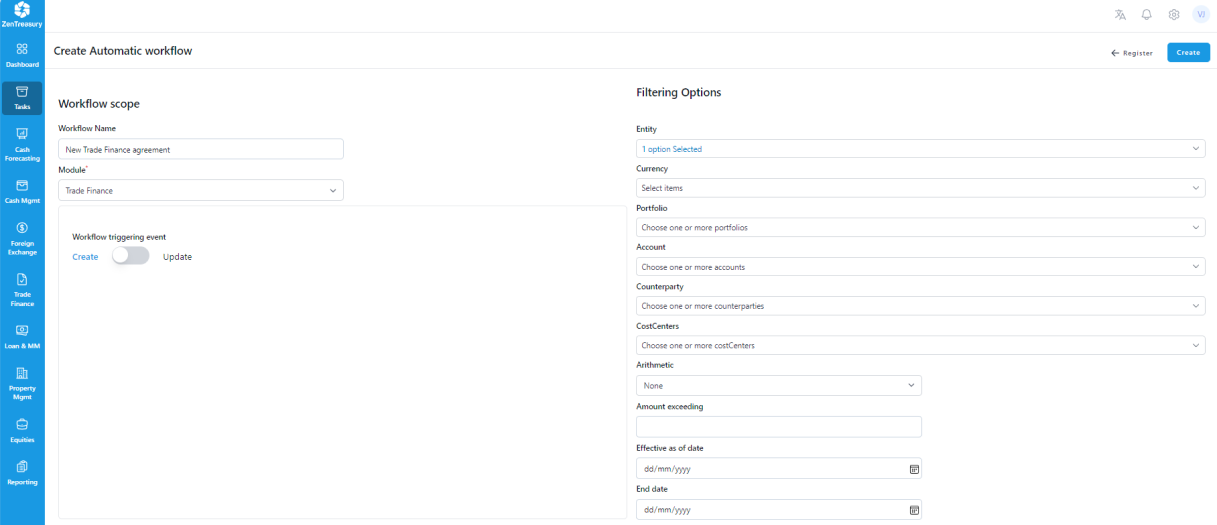
Defining the Approval flow Criteria
If no specific company, currency, or other details are selected, the approval flow will apply to all new Trade Finance types by default. However, it is possible to tailor the approval flow to only include new agreements that meet certain predefined criteria, ensuring a more focused and efficient approval process.
Selecting Approvers
You can select up to 4 users to participate in the approval process. This feature allows for a comprehensive review from multiple departments or levels of authority within the organization, enhancing the thoroughness of the approval process.
Determining Approval flow Order
Below the selection of approvers, you have the option to specify the order of the approval flow. The order can easily be adjusted by dragging the names up or down in the list.

Activating the Approval flow
Once you have defined the criteria and set the approval flow order, click 'Create' to activate the approval flow. With the approval flow now active, all new Trade Finance agreements that meet the specified criteria will go through the designated approval process.
Was this article helpful?
That’s Great!
Thank you for your feedback
Sorry! We couldn't be helpful
Thank you for your feedback
Feedback sent
We appreciate your effort and will try to fix the article