Before entering any Trade Finance agreements, you need to create the Trade Finance types. In practice, you can, for example, create these based on different types of trade finance products you have in the system.
Create New Trade Finance types
1. Click 'Settings - Common Data - Instruments - Trade Finance type'.
2. Click + Icon to create a new Trade Finance type.
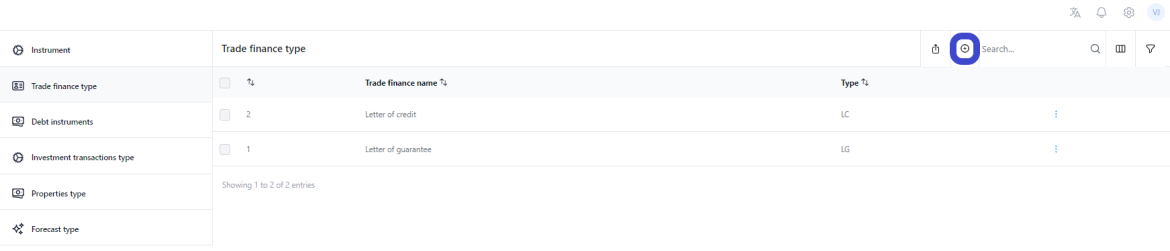
3. Choose a Trade Finance type name.
4. Select Type, it can also be the same as Name.
5. Enter Text. You can add here some additional text for description.
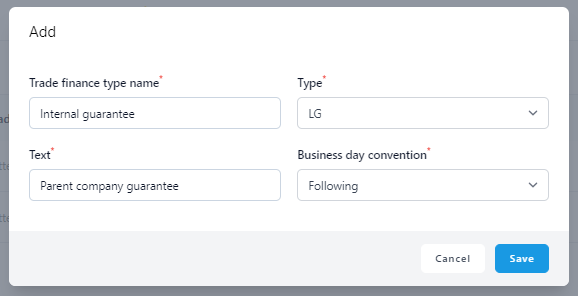
6. Business day convention
If you are planning to follow your guarantee fee payments, you can define how to alter payment dates if the payment goes to a day that is not a business day. Currently, we have in the system only weekends Sat-Sun as non-business days. This is where you can specify how to treat the payment if it would roll out into the weekend.
- No adjustment - paid on the actual day, even if it is a non-business day.
- Previous - the payment date is rolled on to the previous business day.
- Following - the payment date is rolled on to the next business day.
- Modified previous - The date will be the first preceding day that is a Business Day, unless the first preceding Business Day is in the previous calendar month;, in which case that date will be the first following day that is a Business Day.
- Modified following - The date will be the first following day that is a Business Day, unless the first following Business Day is in the next calendar month;, in which case that date will be the first preceding day that is a Business Day.
- End of Month - No adjustment - the payment date is rolled on to end of the payment month, even if it is a non-business day.
- End of Month - Previous - the payment date is rolled on to the end of the payment month, if it is a non-business day to a previous day business.
- End of Month - Following - the payment date is rolled on to the end of the payment month, and if it is a non-business day it rolls to a next day business.
7. Click Save.
Was this article helpful?
That’s Great!
Thank you for your feedback
Sorry! We couldn't be helpful
Thank you for your feedback
Feedback sent
We appreciate your effort and will try to fix the article