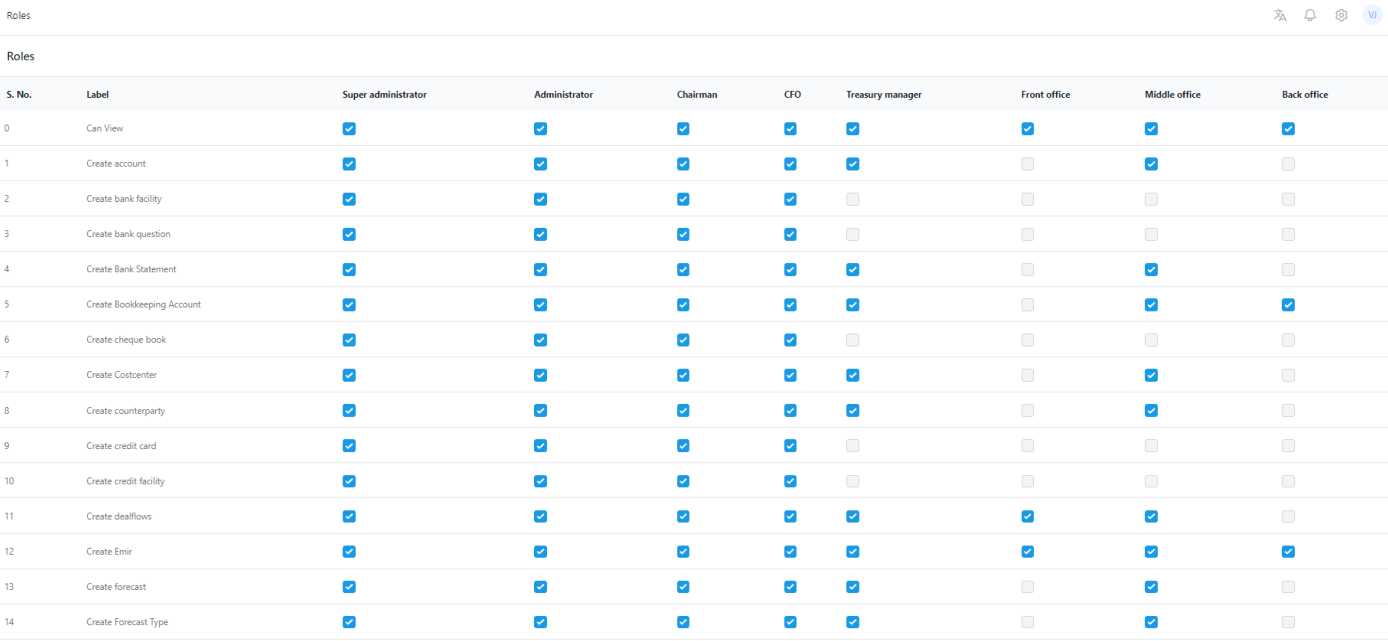
ZenTreasury has a comprehensive tool for managing different user roles. An admin has access to the ‘User Roles’ page via 'Settings - Roles' .
There are several roles:
- Super administrator is ZenTreasury support function role.
- Administrator role is for the company admin and has the same rights in the system.
- Other roles are Chairman, CFO, Treasury manager, Front office, Middle office and Back office.
There are default settings for each role. The rights (labels) of the each role can be separately modified based on the needs of the company. There are over 140 different rights currently in the listing and each right can be adjusted for any role just by clicking the checkmark box.
Was this article helpful?
That’s Great!
Thank you for your feedback
Sorry! We couldn't be helpful
Thank you for your feedback
Feedback sent
We appreciate your effort and will try to fix the article