In ZenTreasury, managing cryptocurrencies involves adding them to the register and updating their exchange rates. This guide details the process for incorporating cryptocurrencies into your financial management approval flows.
Adding a Crypto currency
Step 1: Navigate to Cryptocurrency Settings
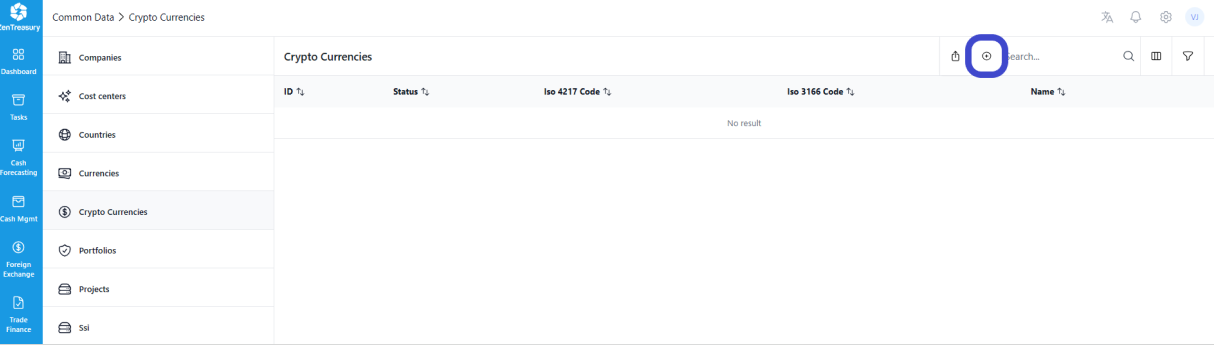
Access the cryptocurrency management area by going to Settings -> Common Data -> Crypto Currencies.
Step 2: Add a Cryptocurrency
Click the '+' icon to start adding a new cryptocurrency.
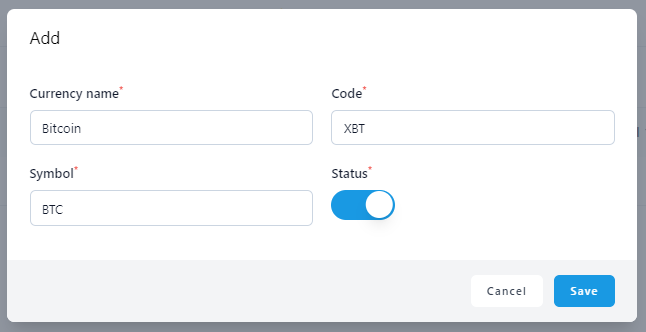
In the 'Symbol' field, enter a description or the official symbol of the cryptocurrency. This is a free text field, allowing you to input the preferred identifier for the cryptocurrency.
Activate the cryptocurrency by toggling the push button to the 'on' position.
Click 'Save' to add the cryptocurrency to your register.
Adding Exchange Rates for a Crypto currency
To add the exchange rate for a cryptocurrency, follow the same process as you would for any other currency.
Navigate to 'Settings' - 'Market Data' - 'Foreign Exchange Rates'.
Was this article helpful?
That’s Great!
Thank you for your feedback
Sorry! We couldn't be helpful
Thank you for your feedback
Feedback sent
We appreciate your effort and will try to fix the article