Currently, securities are only needed for bond valuation when you have selected a "Market value" approach for the instrument valuation.
You can create securities manually, bringing API from a data provider, or by using Excel import function.
You can find Securities register under Settings - Market Data - Securities.
Creating a security manually
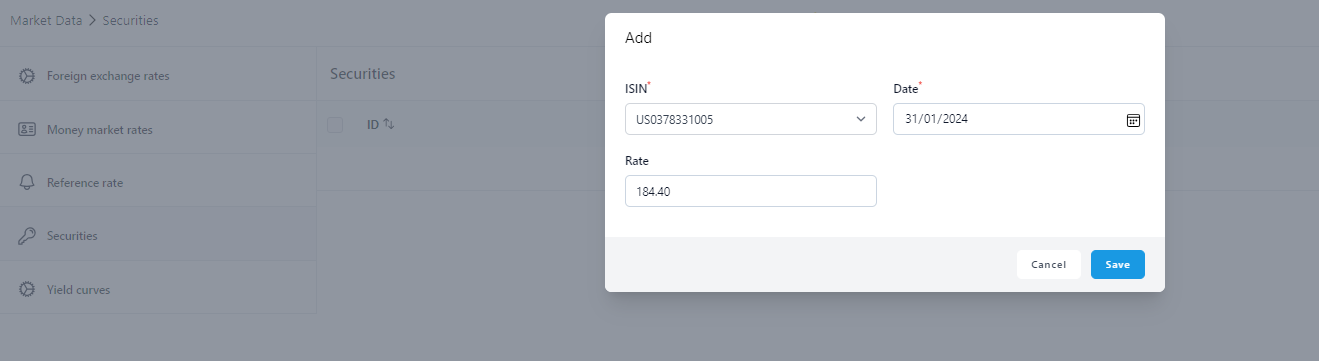
Step 1: Click the + icon top right to add a security.

Step 2: Fill in the data.
- ISIN - It is important that the ISIN code matches exactly the ISIN code in the agreement. This is the link between the agreement and the quote. The ISIN code of the equity can be selected from the dropdown which shows all the options from the equity register.
- Date - Date of the valuation.
- Rate - Rate for the valuation day in question
Click 'Save'.
Excel import for securities
Step 1: Click the Import icon on the top header row.
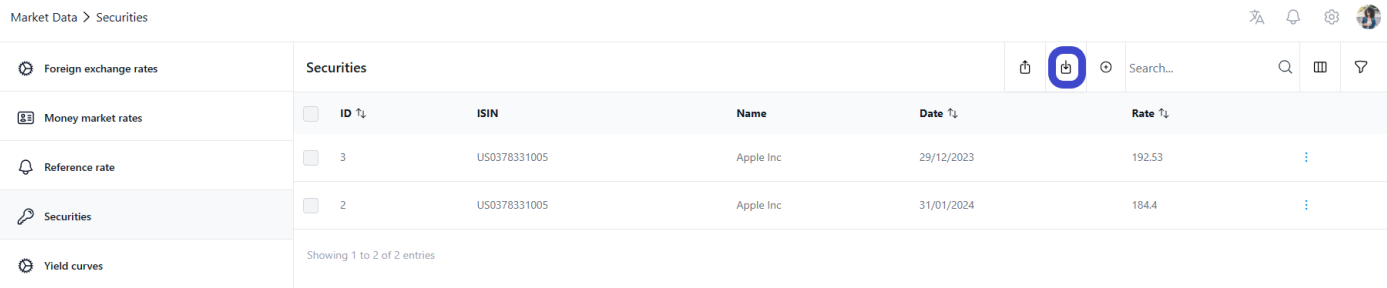
Step 2: Click 'Download Sample' and select Excel option.

Fill in the needed fields.
Was this article helpful?
That’s Great!
Thank you for your feedback
Sorry! We couldn't be helpful
Thank you for your feedback
Feedback sent
We appreciate your effort and will try to fix the article