The Loan Transaction Report in ZenTreasury provides a comprehensive overview of all realised transactions associated with your loan and investment agreements.
Generating the Report
Filtering Options: Click the icon in the middle to access a variety of filtering options, enabling you to customize the report to your needs. Options include entity, portfolio, counterparty or just a loan id for one or several specified loans.
Currency Selection: Convert loan amounts into the selected currency using the end date market rate. This feature depends on the currency rate's availability under Settings > Market Data > Foreign Exchange Rates.
Column Visibility: If you prefer to have less columns, you can hide columns under 'Column visibility'. This way you can present only the preferred information in the report and can run more detailed report separately if needed.
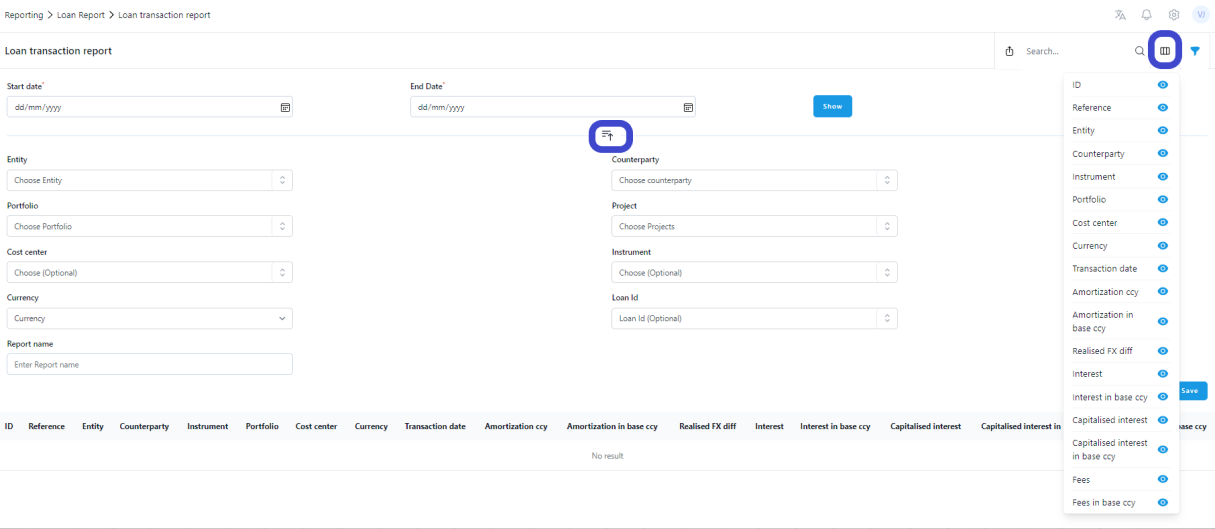
Columns explained
Transaction date:
The actual day of the transaction.
Amortisation amount:
The capital payment in the currency of the agreement.
Amortisation amount in the base ccy:
The capital payment in the entity's base currency, if there is a currency conversion the system uses a payment date fx rate.
Realised FX diff:
Realised difference occurs when you have a loan and you repay debt or when you have an investment and you receive capital back and if your entity and loan are recorded in a different currencies.
- If positive, this is a gain posted normally to the debit BS / credit P&L realised FX difference (gain).
- If negative, it’s a loss posted normally to the debit P&L realised FX difference (loss) / credit BS.
Interest:
The interest payment in the agreement currency.
Interest amount in base ccy:
The interest payment in the entity case currency.
Capitalised interest:
If the interest of a certain loan or investment is capitalised, the interest value should be added into the loan/investment BS value.
Capitalised interest in base ccy:
Here we convert the interest amount with the transaction date fx rate into the entity's base currency, if needed. If positive, then debit the BS Investment / credit P&L interest income. If negative, then debit the P&L interest expense / credit BS loan.
Fees:
If you have added some one-time fee payments into your loan payments, they are seen here.
Fees in base ccy:
If you have added some one-time fee payments into your loan payments, you see those in entity's base currency converted with a transaction date fx-rate.
Was this article helpful?
That’s Great!
Thank you for your feedback
Sorry! We couldn't be helpful
Thank you for your feedback
Feedback sent
We appreciate your effort and will try to fix the article