This report lists your loan/investments based on the Report date. From this report you can see the outstanding loan balance, accrued interest for the report date, and currency valuation for loans where the entity and the agreement are in a different currency.
Report Date: The report is generated based on the selected report date, providing a snapshot of your loans and investments on this specific date.
Filtering Options: From the filter icon you can get several filtering options for the report including entity, portfolio, counterparty or even just loan id for one or several specified loans.
Currency Conversion: Currency selection will translate the loans into the selected currency in the 'in base ccy' fields with the end date market rate, given the currency rate in question is available in Settings - Market Data - Foreign Exchange rates.
Column Visibility:
If you prefer to have less columns, you can hide columns under 'Column visibility'. This way you can present only the preferred information in the report and can run more detailed report separately if needed.
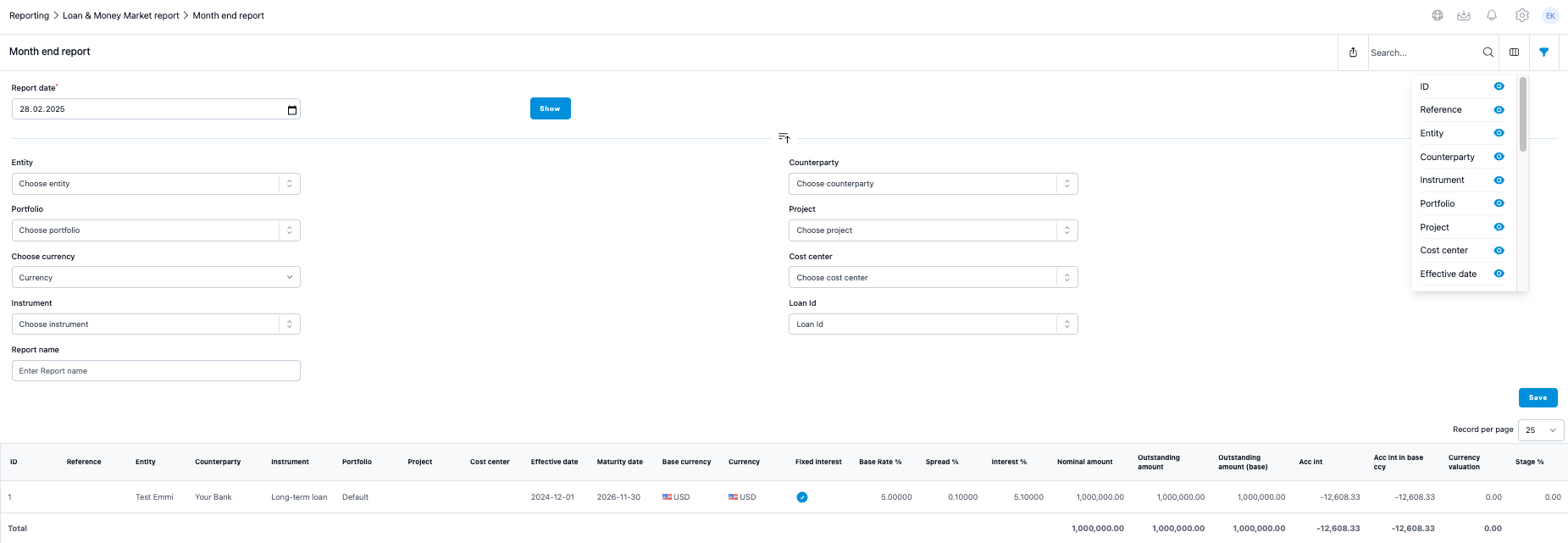
Columns explained
Nominal amount:
This is the original nominal amount of the agreement in the currency of the agreement.
Outstanding amount:
This is the outstanding balance of the instrument at the report date in the currency of the agreement.
Outstanding amount (base):
This is the outstanding balance of the instrument at the report date in the entity's base currency converted with a report date fx rate.
Acc int:
This column brings all the unpaid interest at the report date in the agreement currency. If there is interest that belongs to the report date period, or where the interest period was before the report date, but the interest is still unpaid, the system will summarise all those interests into this column.
Acc int in base currency:
This column brings all the unpaid interest at the report date in the entity's base currency converted with report date fx rate. If there is interest that belongs to the report date period or where the interest period was before the report date but the interest is still unpaid, the system will summarise all those interests into this column.
Currency valuation:
This column calculates the currency valuation for an instrument where the agreement and the entity are in a different currency. The formula checks all positive capital payments and the fx rates for the payments and calculates the balanced average fx rate for the instrument based on those payments and rates. Then, it compares the unpaid debt amount converted with report date fx rate and with balanced average fx rate, showing the difference between these values in the column. For investment, the only difference is that the report checks only negative payments.
Was this article helpful?
That’s Great!
Thank you for your feedback
Sorry! We couldn't be helpful
Thank you for your feedback
Feedback sent
We appreciate your effort and will try to fix the article