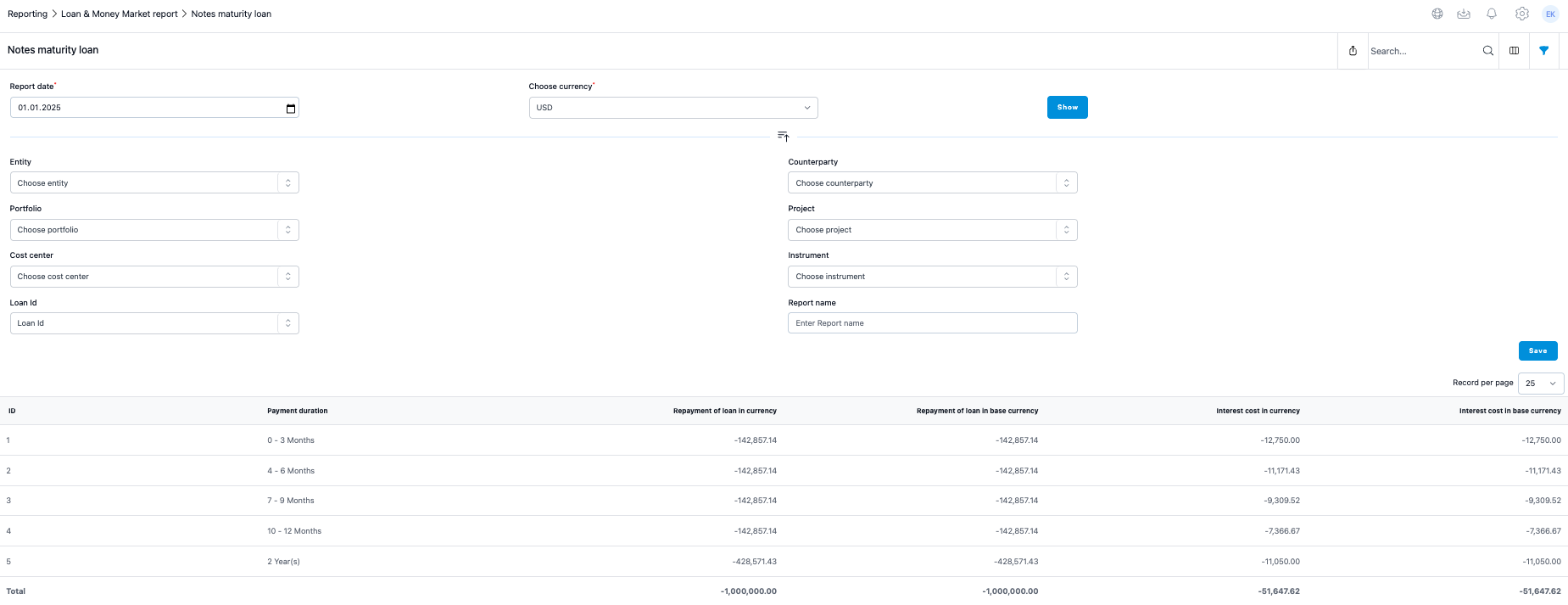
In notes maturity report your future loan payments are split between different maturities. You might need the report for example in your Financial Notes.
Generating the Report
- Select Report Date: If you want to see the loan maturity balance of 31.12.2024, run the report with date 1.1.2025.
- Finalise Agreements: Please note that when you are closing your financial year and want to have the balance of your future payments and the loan/investment balance to match exactly then you should not have changes or new agreements in the system before you have run the report.
Report Filters and Options
From the filter icon you can get several filtering options for the report including entity, portfolio, counterparty or loan id for one or several specified loans.
- Loan ID filter: Specify one or several loan IDs to focus on particular loans.
- Currency selection: Choose the currency for the report. This is necessary if you have agreements in different currencies or if entities have different base currencies. The report will convert loan amounts into the selected currency using the end date market rate, provided the currency rate is available on Settings > Market Data > Foreign Exchange Rates.
- Instrument types: If your portfolio includes a variety of instrument types, it is advised to use the filter options to select only those instruments you wish to include in the report. This helps in focusing the report on relevant instruments simplifying the analysis.
Was this article helpful?
That’s Great!
Thank you for your feedback
Sorry! We couldn't be helpful
Thank you for your feedback
Feedback sent
We appreciate your effort and will try to fix the article