Standard Settlement Instructions (SSI) for Money Transactions
This section provides a guide for setting up a Payment Instructions Register for incoming funds. The instructions can be customized based on the currency, counterparty, and specific account involved.
Note: Importing Foreign Exchange (FX) deals via bank integration will fail if the SSI for each FX transaction currency are not properly defined.
To Add an SSI Rule:
Navigate to 'Settings' > 'Common Data' > 'SSI'.
Click on the '+' icon to add a new SSI rule.
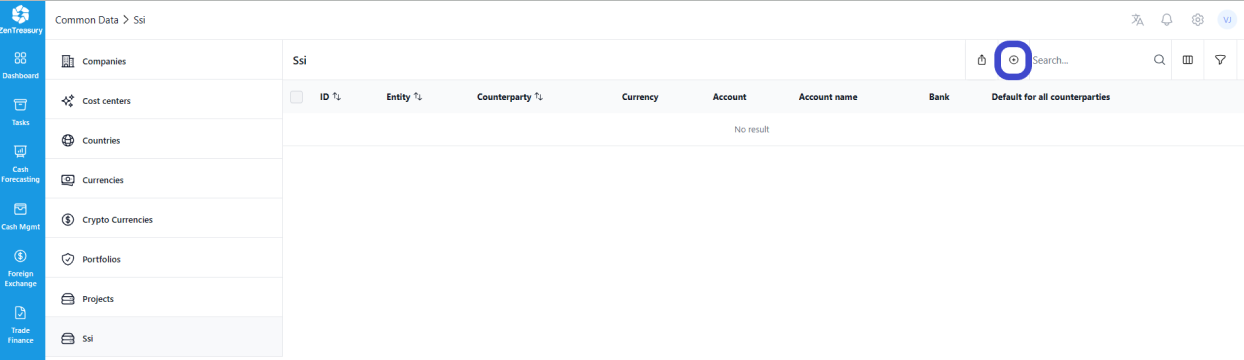
To Complete the SSI Rule Setup:
Add the necessary details, including the company information and any other relevant data.
Click 'Save' to finalize the rule.
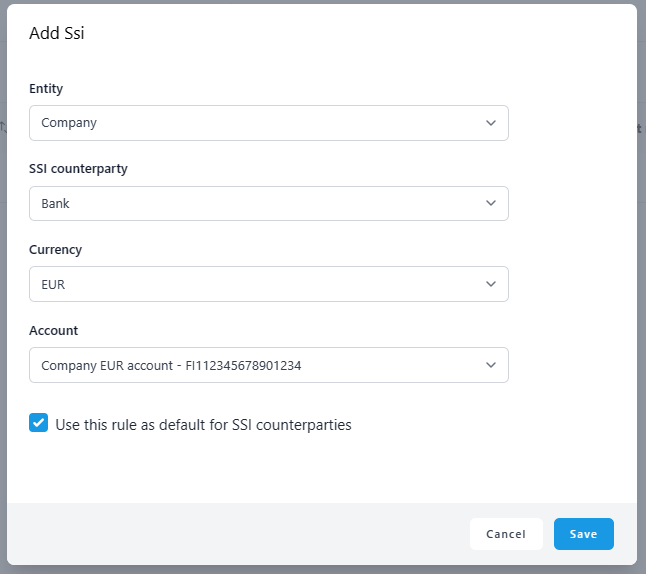
Important for FX Transactions:
Ensure that this process is completed for every currency involved in FX transactions, especially if the FX deals are imported directly via bank integration. Failing to define an SSI rule for each currency will result in the import process not functioning correctly.
Was this article helpful?
That’s Great!
Thank you for your feedback
Sorry! We couldn't be helpful
Thank you for your feedback
Feedback sent
We appreciate your effort and will try to fix the article