Sometimes, you may need to work with a cross currency pair that isn't directly available or imported into your system. If you're unable to obtain this data from an additional source, ZenTreasury allows you to use existing currency pairs to derive new cross rates.
Example Scenario:
If your system imports ECB fixing rates like EURUSD, EURSEK, and EURNOK, but you also need rates for USDSEK and USDNOK, you can calculate these using the existing pairs (EURUSD, EURSEK, and EURNOK).
It's important to note, however, that these calculated rates are not official and may differ from rates provided by central banks or other official sources. For instance, rates from the European Central Bank (ECB) might not match those from Riksbanken, leading to variations in the calculated results.
Enabling cross currency calculations:
1. ) Go to Settings - Market Data - Foreign exchange rates.
2.) Add the new currency pair by clicking the 'Add currency pair' icon.
Note: To perform this action, you must have the necessary permissions. This requires that you have the role to Create Fx Rate by default (the Front Office role has this enabled). If your role doesn't include creating FX rates, please ask your admin or someone with Front Office role to add the pair.

3.) Select base currency, converting currency and referencing currency from the dropdown selections and click 'Save'.
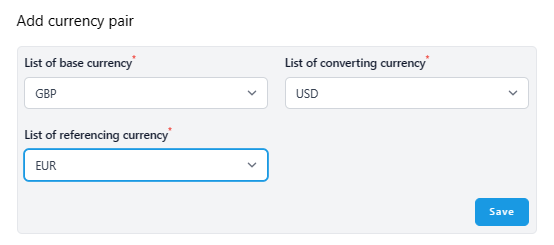
4.) From this day forward, the rate starts updating automatically once it finds the rates for the currency pair in question.
Was this article helpful?
That’s Great!
Thank you for your feedback
Sorry! We couldn't be helpful
Thank you for your feedback
Feedback sent
We appreciate your effort and will try to fix the article