First, you need to make sure that the debt instrument you are going to use, is saved with an option 'Can have a mirror deal' active. Initially, when creating an instrument you are unable to see this selection. After the initial creation of a debt instrument, you can go and edit it and then activate the selection.
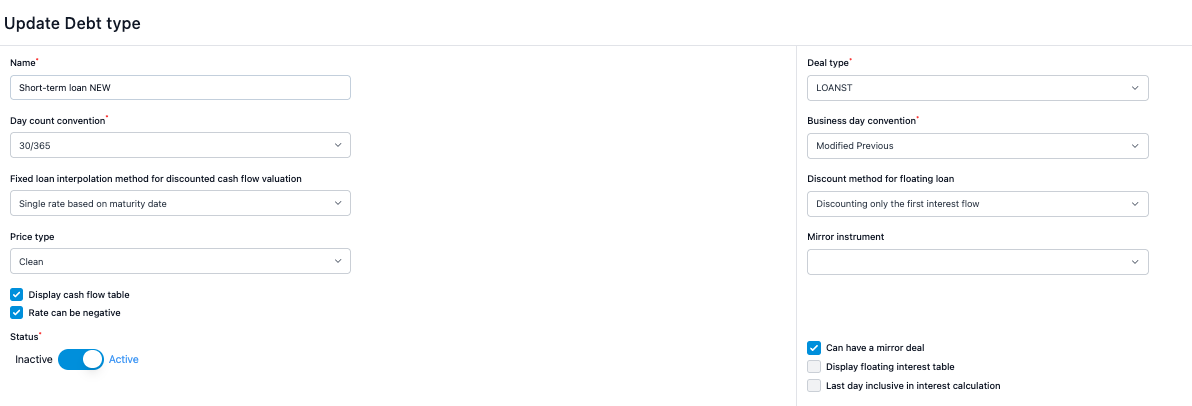
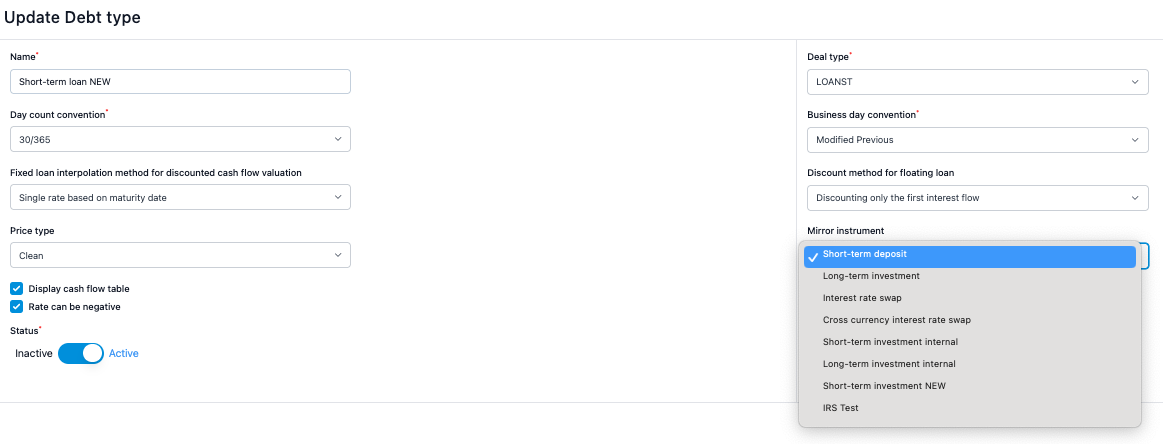
Also, you must set the default mirror instrument related to the main instrument. For example, if you are normally creating inter-company loans from the parent company perspective, where the parent is usually lending (so the main loan is an investment instrument, the mirror instrument should be a loan instrument).
Please note that you have to make sure that the counterparty of the loan is an entity. You can confirm this from Settings > Common Data > Companies.
After the instrument settings are correct, you can go and create the main loan. 'Create mirror loan' icon appears in the next to ‘Save' button in the top right section of the cash flows view. Save the mirror loan. This allows you to run reports and accounting vouchers from a mirror loan perspective as well.

Note: You cannot create more than one mirror loan and you must have the 'Create loan' role in the system.
Was this article helpful?
That’s Great!
Thank you for your feedback
Sorry! We couldn't be helpful
Thank you for your feedback
Feedback sent
We appreciate your effort and will try to fix the article